Xfer Nerve Review – Drum Machine Plugin
Contents
Xfer Nerve

Xfer Nerve is a drum machine plugin for building beats from samples and loops. Its compact interface takes some learning, but the detailed pattern editing, sample shaping and Repeater make it a useful choice for electronic production and live variations.
A software drum machine lets you build a kit, program its rhythm and process the individual sounds inside your DAW. Nerve puts those jobs in one plugin, with a particular emphasis on reshaping samples you already own.
If you prefer working on a computer, it can take the place of a separate drum machine. You will need a compatible host application: Nerve is a plugin, so a PC or Mac on its own is not the complete setup.
The factory library includes kits, patterns, individual drum hits and loops. You can also bring in your own sounds, which is useful if you have a sample collection you want to turn into playable kits.
The interface looks basic, but there is plenty beneath it. The included library draws on sound designers such as SampleMagic, Dom Kane, SampleSquad, PowerFX and Richard Devine, while the editing tools let you take those sounds in a different direction.
Design
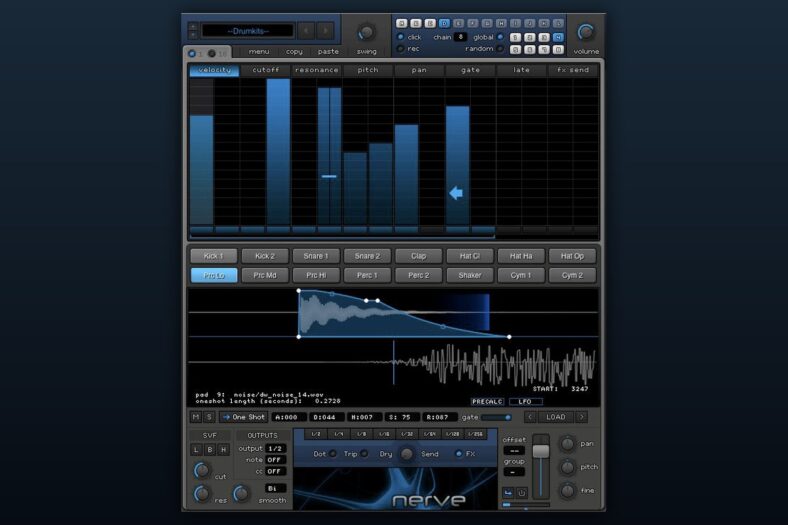
As I’ve already mentioned, one of the things that characterize this plugin is its GUI, which looks pretty rudimental. I’m not sure what was the main intention of designers, but it definitely emphasizes the plugin’s simplicity. Everything looks like it comes from two decades ago, but a great thing is that such a design doesn’t affect the overall functionality.
Speaking of the functionality, such simple GUI layout allows instant and super-easy saves and loads. Still, impressions on this matter are mixed. On one side, it is great that you can save pretty much everything. By everything, I mean patterns, single hits, kits, MIDI mapping, step sequencer and much more.
The loading workflow is less inviting. Kit and pattern names do not always tell you much about their sound, so expect to spend some time learning your way around the library.
Sample audition is available through the navigation buttons, so you do not have to judge a sound by its filename alone. You can also use your own organised sample folders when the factory naming gets in the way.
You can load your own sounds and edit them inside Nerve. MIDI input and output are supported too, including assignable notes and MIDI CC control. The controller workflow takes more setup than simply expecting every control to have a visible MIDI Learn button.
Three Main Sections
Practically, there are three main sections in this plugin – Pattern Editor, Pads and Waveform section, and Mixing section. Everything is very transparent and you won’t find any trouble to locate any of the desired functions.
Pattern Editor
The Pattern Editor section is designed in accordance with the plugin’s overall simplicity. It is very intuitive and simple to use. You can choose between two views, called “1” and “16”. The “1” allows you to program just one parameter and offers you access to things like Velocity, Cutoff, Pitch and Late.
On the other side, the “16” mode resembles a typical piano roll-style programmer. A great thing is that there are keyboard shortcuts for various functions, which would definitely have a good impact on your workflow.
Pads and Waveform
This section is probably the strongest point of the Xfer Nerve. There’s a lot of options and everything is in its place. The design is pretty straightforward. There are 16 pads, with samples or loops, and you can adjust each one pretty quickly. Just click on a pad and its waveform will appear, so you can easily do all the tweaks you need.
The PreCalc effects process the sample before playback. You can change their settings to reshape the sound, but they are not the same as effects you continuously automate while a beat plays. Their processing does not add a playback CPU load; filters, envelopes and modulation provide movement afterward.
There is a broad range of sample treatments here, from pitch shifting and ring modulation to sine, square, saw and triangle resynthesis. That makes this section useful when a familiar drum hit needs a different texture, rather than just another layer of effects in your DAW.
Mixing
The mixer provides filter, resonance, cutoff and output routing controls, plus internal sidechain compression. The Repeater retriggers selected pads for fills and stutters, and MIDI notes can trigger or retrigger patterns. The Chain function handles longer pattern sequences.
Loops
Nerve can read slice points from REX and RX2 files, with up to 16 slices inside a single pad. You can rearrange the triggers to build a new rhythm from the source loop. WAV and AIF loops have separate stretching options for matching your host tempo.
You can also extract timing and level information from a REX loop and apply that groove to your rhythms. Save the swing settings to reuse them when you want several parts to share the same feel.
Compatibility and Licence
Nerve is a paid Mac and Windows plugin, with VST and AU support; Xfer also confirms VST3 support for the paid version. The free demo runs for 20 minutes per operation, includes limited content and cannot save. It is a trial, not a free edition.
Install the base content and then the latest update from your Xfer account, using your account serial number. On recent macOS versions, Xfer specifically directs owners to the forum update. Check with Xfer about the current build for your Mac and host before buying: the public demo and customer builds have not always matched, and the developer has described the resizable and Apple Silicon builds as beta. Updates and support are included with the purchase.
Conclusion
Nerve makes most sense if you want detailed sample editing and loop manipulation alongside a drum sequencer. Its interface is dated, and browsing takes patience, but the combination of pad editing, groove controls and performance tools gives it a clear purpose.
For a new purchase, try the demo and confirm the current installer works with your host. If your priority is drum synthesis, layered kits or finding sounds in a large sample collection, the alternatives below take those jobs in different directions.

Alternatives
Don’t forget to check some other software as well. The market is full of great plugins and here are some of my picks. If you want to read more then check out our article on the best drum vsts.
Sonic Charge Microtonic 3
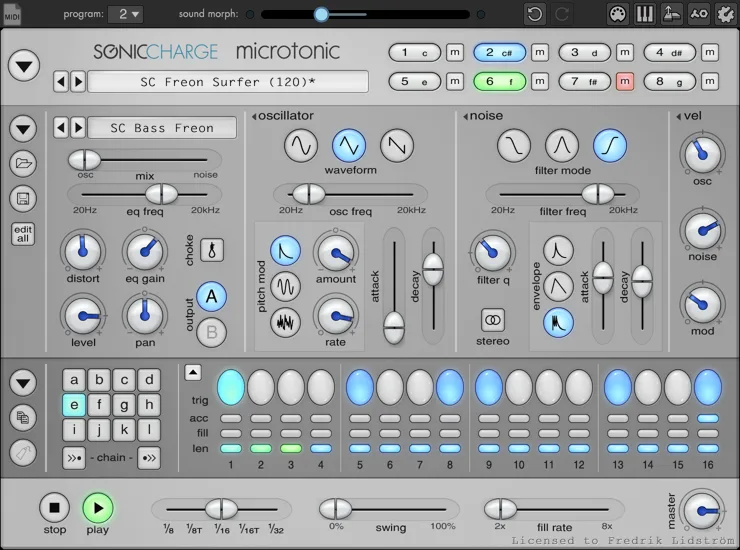
Microtonic is the alternative I would choose for making electronic drum sounds from scratch. Its eight voices use synthesis, with a built-in pattern engine, morphing and randomisation. It suits producers who want to tune the character of a kick or percussion sound rather than search for another sample.
There is no sample playback, so it will not replace Nerve if importing loops is central to your workflow. It supports VST 2.4 and VST3 on Windows and Mac, plus AU on Mac. A Mac standalone is included; Windows users need a compatible host. The paid licence includes service updates, and the three-week trial is temporary. Register the purchase through Sonic Charge and use its Authenticator to activate it.
Wave Alchemy Triaz
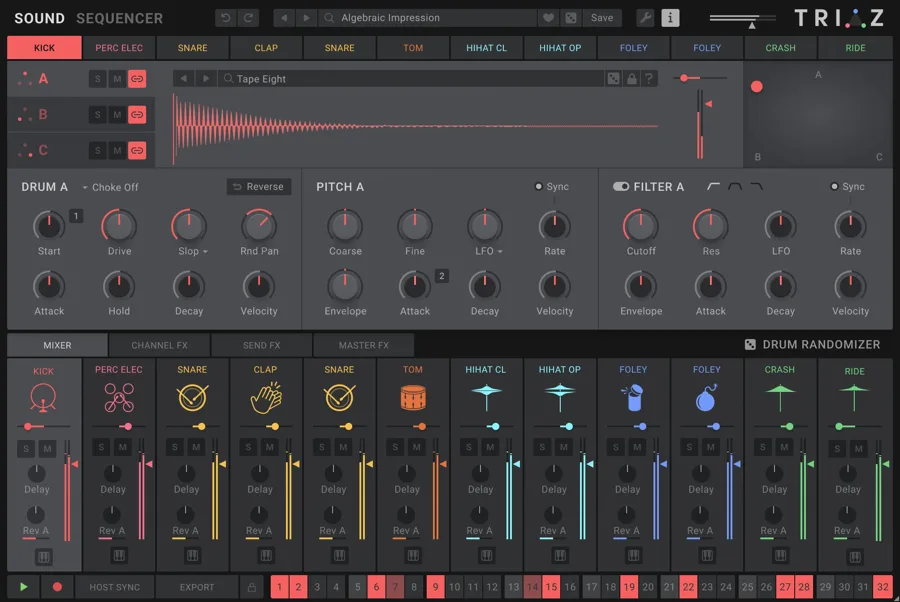
Triaz is a good fit if you want to build detailed sampled kits. Each of its 12 drum channels can blend three sample layers, so you can combine different attacks, bodies and textures before programming the pattern. The full version includes 15,000 samples and more than 700 presets, and you can import your own collection.
Its sequencer has per-step controls and motion sequencing for changing parameters across a beat. You can drag audio or MIDI into your DAW when the pattern is ready. Choose the full native plugin for this workflow: it runs as VST3, AU or AAX on Mac and Windows, including native Apple Silicon support, without Kontakt. Internet activation uses an email address and serial number, with offline use afterward. The 14-day demo has reduced content; it is separate from the full licence linked here.
XLN Audio XO
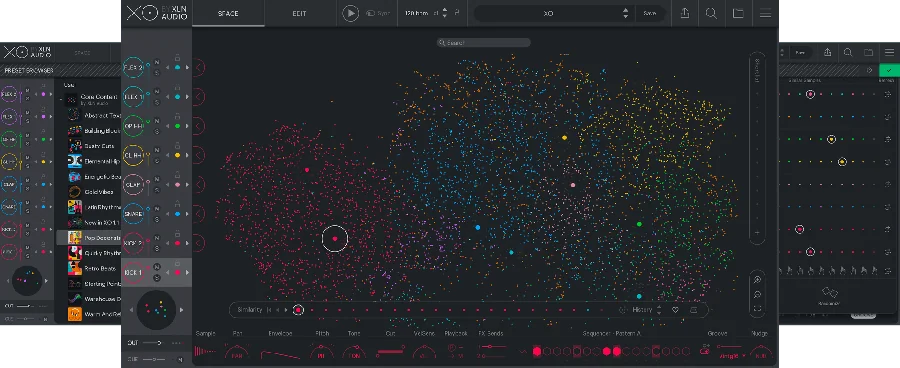
XO is worth considering if finding the right one-shot is the slow part of making a beat. It groups your drum samples by their sound in a visual map, so you can audition nearby choices without working through every folder. Load eight sounds into its sequencer, shape them with the built-in controls and export the result as audio or MIDI.
The full XO licence includes more than 8,700 one-shots and over 240 editable beat presets. Expansions are optional. It works as a standalone application or a 64-bit VST, VST3, AU or AAX plugin on compatible systems; XLN lists macOS 10.13 or later and Windows 10 or 11. Installation and authorisation use an XLN account and the Online Installer. Its ten-day trial gives you time to check the workflow, but ongoing use requires a licence. Choose it for sample discovery and beat building; it does not include the pitched synth channels of a full groovebox.