22 Free Drum VSTs to Improve Your Beats

Free drum plugins can cover acoustic kits, electronic drum machines and individual percussion sounds without buying a large sample library. The useful choice is the one that supplies the sounds you need and runs in your DAW.
MT Power Drum Kit 2 is a good starting point for acoustic drums and ready-made grooves. For your own samples, choose the free Sitala 1 download; for quick electronic kits, Drum8 is a simpler option.
These 22 instruments include current releases and useful legacy freeware. Check each entry’s host and format requirements: a Windows 32-bit VST or older Mac AU will not work in every modern setup. Most need a DAW; Sitala 1 and BFD Player also offer standalone applications.
Contents
- 1. TS 808
- 2. MiniSpillage
- 3. Gnome Kick
- 4. EXD-80
- 5. Sitala 1
- 6. Synsonic BD-808
- 7. Synsonic BD-909
- 8. Nasty Looper
- 9. Audio Damage Tattoo
- 10. Drum8
- 11. Wollo Beat
- 12. BFD Player
- 13. MT Power Drum Kit 2
- 14. ChowKick
- 15. Royotoms
- 16. BPB Cassette Drums
- 17. T.Rex 606
- 18. Drumtastic
- 19. Drumatic 3
- 20. Line of Legends
- 21. VS Conga
- 22. Junn JM-1
- Conclusion
1. TS 808

TS 808 is a free Windows drum instrument based on the Roland TR-808. If you want the sounds of a classic drum machine with more room to adjust each voice, this is a useful older option.
Its voices are synthesized from circuit modelling rather than played from a sample library. The developer used the original service schematics to build the models, then compared their output with recordings. Many controls have a wider range than the hardware, so you can move beyond a straightforward 808 imitation.
There is no built-in sequencer: write the rhythm as MIDI in your DAW. This is a legacy Windows VST, so check that your host can load older plugins before downloading. Plugin Boutique provides the free download through an account; it is not a standalone drum machine.
Check it out: TS 808
2. MiniSpillage

MiniSpillage is a compact drum synthesizer for Mac with three editable pads and three sound models: Bass Drum, Wood Drum and Electro Hi-Hat. It suits producers who want to shape individual percussion sounds instead of searching through a large sample library.
These models cover kicks, wooden percussion and hats, with envelopes, modulation, distortion and resonant filtering to change their character. You can save individual pads as well as whole kits, which makes it practical to build a small collection of your own sounds.
The free 1.3.2 release is a legacy Audio Unit instrument requiring an AU host. Its Mac installer includes an Intel 64-bit build, but it is not native Apple Silicon software. The 64-bit DSP engine describes its audio calculations; it does not mean that every current Mac or DAW can run it.
Check it out: MiniSpillage
3. Gnome Kick

Gnome Kick focuses on one sound: a synthesized bass drum. It can play a kick on its own, although the developer designed it mainly for layering extra low-end weight beneath another kick.
The Analog control adds modulation to the oscillators. That gives you a quick way to vary the supporting thud without building a complete drum patch from scratch. Program its notes alongside the main kick in your DAW and adjust the balance to suit the track.
This is an older SynthEdit instrument for Windows, with a 32-bit VST build. A compatible host or bridge is required. It does not detect and replace an incoming audio kick automatically, and there is no Mac version in the documented release. Choose ChowKick below if you need broader platform support and more sound-design controls.
Check it out: Gnome Kick
4. EXD-80

EXD-80 is a Windows drum and percussion synthesizer for electronic sounds. It generates its voices rather than loading samples, so it is better suited to designing kicks, snares, hats and unusual percussion than recreating a recorded acoustic kit.
The interface provides several percussion modules and four stereo output pairs. Each output pair has its own Granulator and Waveshaper effects, allowing you to distort or break up one group of sounds while leaving another cleaner.
There are 128 patch locations with 16 factory drum kits, editable MIDI note mappings and host automation. The free release is a legacy 32-bit VST instrument, which needs a host that can load that format or an appropriate bridge. Its 32-bit architecture is a compatibility restriction, not a description of its sound quality.
Check it out: EXD-80
5. Sitala 1
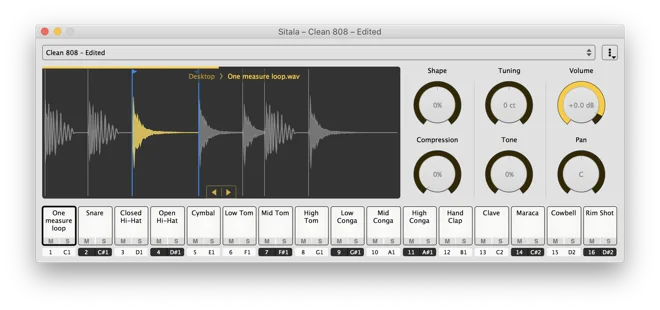
Sitala 1 is a straightforward choice for building a kit from your own samples. Its sixteen pads accept drag-and-drop sounds, while six main controls adjust shape, compression, tuning, tone, volume and pan.
You can trim the start and end of a sample or slice a loop into separate hits. That is useful when a drum break contains a snare or hat you want to play independently. Individual outputs let you add separate processing in your DAW, and the version 1 release includes automatic multi-output setup in REAPER.
Choose the developer’s free version 1.0.9 download. Sitala 2 is a separate paid release, and its newer features are not included here. The free version has Windows, Mac and Linux packages, with VST, AU, AAX and standalone availability depending on the operating system. Use the version 1 download labels to select the correct build.
Check it out: Sitala 1
6. Synsonic BD-808

Synsonic BD-808 concentrates on the bass drum from the Roland TR-808. It models the original circuit and gives you direct controls for tuning, fine tuning, accent, level, decay and tone.
That focused layout is useful when a full drum machine would be unnecessary. Adjust the decay for a shorter kick or a sustained low note, then use MIDI pitch control when you want to play it as a bass instrument. The other parts of your beat will need separate instruments or samples.
The basic BD-808 remains free, with 64-bit Windows VST2 and Mac VST2/AU downloads. It requires a compatible plugin host. The developer also offers BD-808-PRO with free activation instructions, but that is a different edition: the basic download and interface shown here should not be confused with PRO’s additional processing controls.
Check it out: Synsonic BD-808
7. Synsonic BD-909

Synsonic BD-909 models the bass drum circuit of the Roland TR-909. Like BD-808, it is a dedicated kick instrument rather than an entire drum kit.
Its extra shaping controls include distortion, noise decay, tune depth, hold and pitch. You can adjust the attack and body of the kick, then increase distortion when the track calls for more harmonics. MIDI pitch control also lets it act as a bass synthesizer.
The included factory presets are starting points for synthesis. BD-909 does not import your own drum samples, so use Sitala if sample loading is what you need. The free download is 64-bit VST2 for Windows and VST2/AU for Mac; a compatible DAW or plugin host is required.
Check it out: Synsonic BD-909
8. Nasty Looper

Nasty Looper combines a drum machine with a sample-based groovebox. Its sixteen cells accept WAV files, with the first twelve handling individual drum parts and the last four intended for loops.
The drum cells offer pitch, start and end adjustment, filters, delay and pattern sequencing. The loop cells let you set the beat length of an imported loop, while the break sequencer can insert silences into a pattern. MIDI mapping makes it an interesting older option for a pad controller.
A built-in synth, limiter and demonstration soundbank add to the package. The main limitation is compatibility: this is a legacy Windows 32-bit VST release, not a current Mac or VST3 instrument. Use a compatible host or bridge, and expect a larger, older-style interface than the simpler samplers in this list.
Check it out: Nasty Looper
9. Audio Damage Tattoo
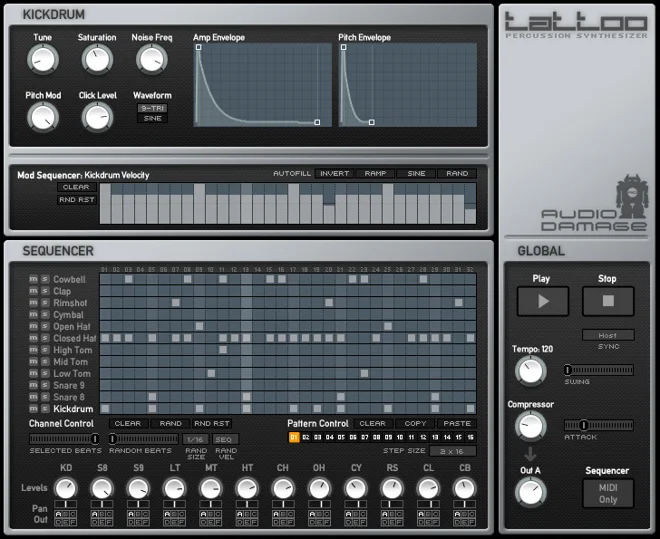
Tattoo is an electronic drum synthesizer with twelve voices and an internal step sequencer. It is a useful option when you want to program a complete synthesized rhythm rather than assemble a kit from samples.
The voices cover kick, snares, toms, hats and other percussion, with sound-specific controls. Parameter sequencing and randomization can introduce movement within a repeated pattern. Its VST version can also send sequencer MIDI to another instrument when your host supports that routing.
Audio Damage distributes Tattoo 1.2.0 through its free legacy archive. It is discontinued software supplied without support, with Windows VST2 and Mac VST/AU installers rather than VST3 or AAX. Check compatibility with your host before relying on it in a project. The archive is a free full legacy instrument, not the trial of a current product.
Check it out: Audio Damage Tattoo
10. Drum8
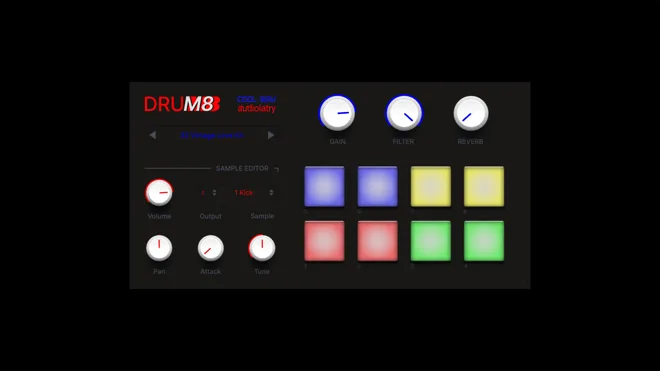
Drum8 is a free sample-based instrument with forty kits and 320 sounds. It is a practical starting point for hip-hop, trap and electronic beats when you want to choose a preset kit and begin programming.
Each kit uses eight pads. Individual volume, attack, pan and tuning controls let you change the balance of the sounds, while the choke function helps related hits cut each other off. A global low-pass filter and room reverb provide quick adjustments across the kit.
The samples are original and royalty-free for use in your music. Drum8 is a ROMpler: choose from its supplied sounds rather than treating it as a general-purpose importer for your own samples. The current download uses VST3 on Windows and VST3/AU on Mac. It requires a compatible host and does not include AAX for Pro Tools. Donations are optional.
Check it out: Drum8
11. Wollo Beat

Wollo Beat is an older 808-style percussion instrument with two drumsets, each containing fifteen velocity-sensitive sounds. It offers more individual sound controls than its small interface first suggests.
Each sound has volume, pan, filtering and pitch adjustments. Delay and reverb provide further processing, and the preset manager lets you keep useful combinations. It is worth considering when you want a self-contained collection of electronic percussion with a distinctly older software workflow.
The creator offers it as free Windows donationware. Wollo Beat 2 is a 32-bit VST plugin, so it needs a suitable Windows host or bridge; it is not a native 64-bit or Mac instrument. That restriction is worth checking before spending time learning its controls.
Check it out: Wollo Beat
12. BFD Player
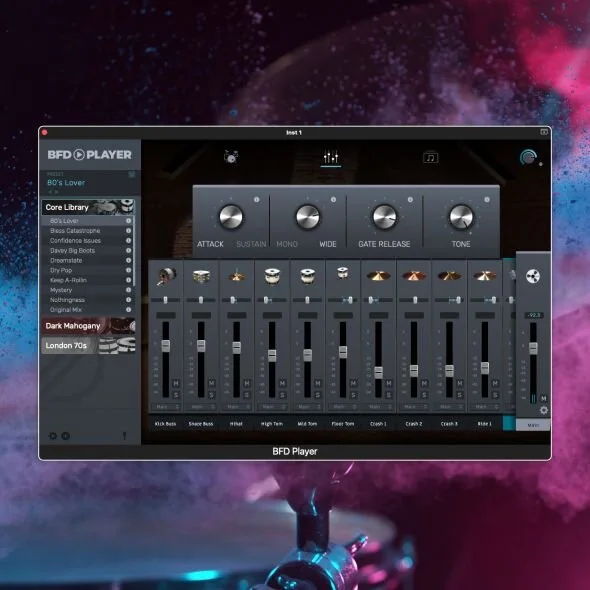
BFD Player provides a free acoustic drum library, a mixer and ready-made grooves. It is a useful alternative to the electronic machines here when you need drums for a song arrangement.
The free Core library is included with the player. You can browse its grooves, arrange them on the internal timeline and adjust the drum balance in the mixer. Separate output routing also lets you process parts in your DAW. Additional expansion libraries are separate products; their kits should not be counted as part of the free download.
BFD Player works as a standalone application or a VST2, VST3, AU or AAX plugin, depending on the operating system. Authorization uses an inMusic account and requires an internet connection. The developer lists Windows 10 version 22H2 or later, or macOS Ventura or later on Intel and Apple Silicon. It has more demanding system requirements than the legacy instruments in this list.
Check it out: BFD Player
13. MT Power Drum Kit 2

MT Power Drum Kit 2 is a good place to start for acoustic drums in pop, rock and metal. Its sampled kit and familiar drum-kit interface make it a useful contrast to the electronic instruments in this list.
The groove library helps you build an accompaniment without drawing every note by hand. You can combine grooves and fills in the composer, then move the MIDI into your DAW for further editing. The kit’s mixer lets you adjust the balance of the individual drums.
The full version 2.1.5.1 is free. Registration and donations are optional: the START button bypasses the activation screen. It is a plugin rather than a standalone app, with VST, AU and AAX options and additional VST3 builds for supported platforms. Choose the Windows, Mac or Linux package and format that match your host.
Check it out: MT Power Drum Kit 2
14. ChowKick
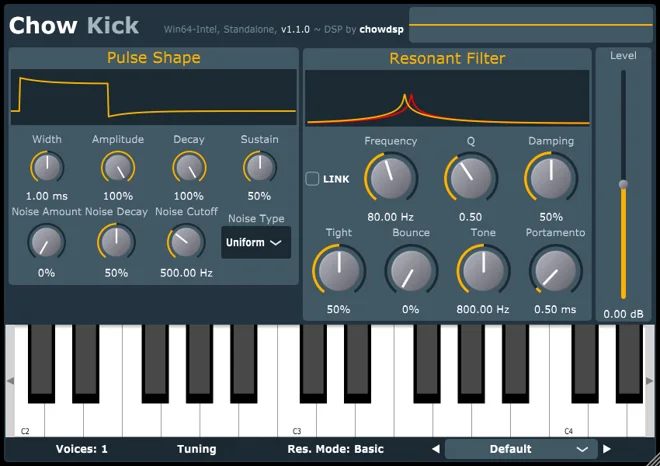
ChowKick is a free kick synthesizer based on models of drum-machine circuits. It is a stronger choice for detailed kick design than a sampler when you want to change how the sound is generated.
The pulse shaper controls the excitation of a resonant filter, while nonlinear modes change the body and distortion of the result. You can tune the kick from incoming MIDI notes, which is useful for matching a sustained electronic kick to the song. Presets offer starting points without preventing further editing.
The open-source 1.2.0 release adds velocity sensitivity and CLAP support. Developer downloads cover Windows, Mac and Linux, with a separate 32-bit Windows package. Mac builds support Intel and Apple Silicon. Select the plugin format supported by your host; this is a MIDI-triggered instrument, not an audio-triggered drum-replacement effect.
Check it out: ChowKick
15. Royotoms
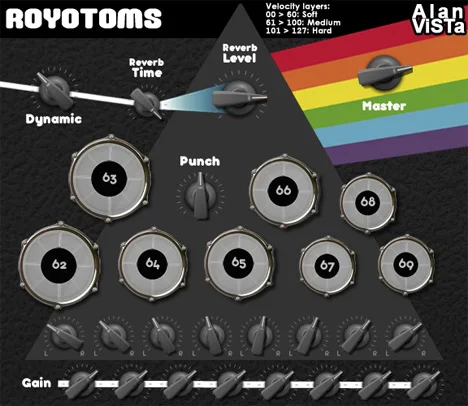
Royotoms adds an eight-piece sampled rototom set to your DAW. It is a useful choice for pitched tom runs, fills and extra percussion alongside a conventional drum kit.
The recordings have three velocity layers and two round-robin samples per layer, giving repeated notes some variation. The instrument contains dry mono hits and a matching stereo reverb layer, so you can choose how much of the spacious sound sits behind the attack.
This is a specialist instrument rather than a complete kit: you will need other sounds for kicks, snares and cymbals. Alan ViSTa offers it free and links to the hosted downloads from the official product page. Windows 32-bit and 64-bit VST and Mac VST/AU packages are available. These are older plugin formats; do not assume VST3, AAX or native Apple Silicon support.
Check it out: Royotoms
16. BPB Cassette Drums
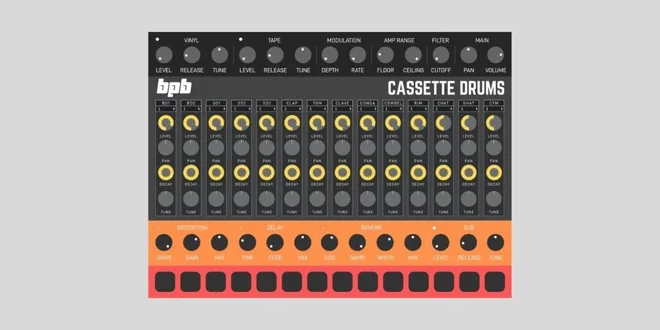
BPB Cassette Drums combines sampled TR-606, TR-808, TR-909 and MFB-522 sounds in one free instrument. It suits lo-fi and electronic tracks where you want a choice between cleaner drum hits and sounds already coloured by tape processing.
The combined edition contains thirteen kits and fourteen drum channels. Each channel has volume, pan, decay and pitch controls, with separate output routing for further processing. Built-in effects provide extra distortion, reverb and delay, although the tape character in the processed samples is already part of the recording.
The instrument was released by Bedroom Producers Blog with SampleScience. Use the combined BPB Cassette Drums download rather than assuming that an older three-plugin bundle has the same interface or features. It is free through the publisher’s pay-what-you-want download and runs in Windows or Mac hosts supporting VST, VST3 or AU.
Check it out: BPB Cassette Drums
17. T.Rex 606

T.Rex 606 keeps the drum-machine workflow simple. It is a sample-based instrument built around seven classic TR-606 sounds, with a small set of controls instead of a deep synthesis page.
The seven pads make it easy to audition the sounds, while the main volume and reverb controls handle the overall level and space. Program the rhythm in your DAW when you want a quick 606-style part without learning another sequencer.
Max Project lists T.Rex 606 as a free release with 32-bit and 64-bit Windows VST builds and Mac VST/AU downloads. It is older software, so check the format and operating-system compatibility of the selected package. There is no reason to assume that a legacy Mac download supports native Apple Silicon simply because it is labelled Mac.
Check it out: T.Rex 606
18. Drumtastic
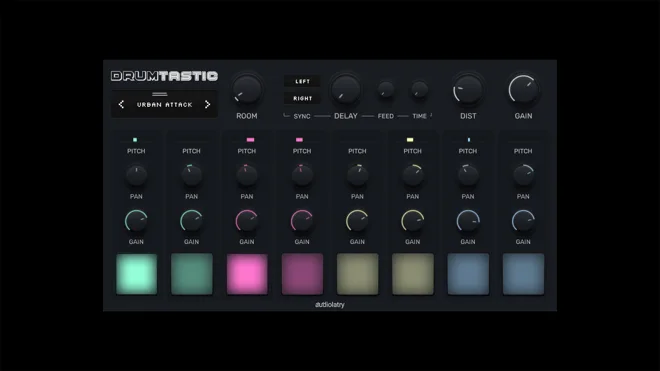
Drumtastic supplies fifty free kit presets for hip-hop, trap and electronic music. Choose it when a broad selection of ready-made kits matters more than importing your own samples.
Each kit has eight pads with individual gain, pan and pitch controls. Global room reverb, delay and distortion let you change the overall presentation without adding an effect to every drum channel. The limited number of controls keeps the workflow manageable when you are sketching a beat.
Its samples are royalty-free for use in personal and commercial music. The developer’s current download guidance specifies VST3 for Windows and VST3/AU for Mac; AAX is not supported. You need a compatible DAW or plugin host. Donations are optional, and the free instrument should not be confused with a time-limited demo or a paid expansion pack.
Check it out: Drumtastic
19. Drumatic 3
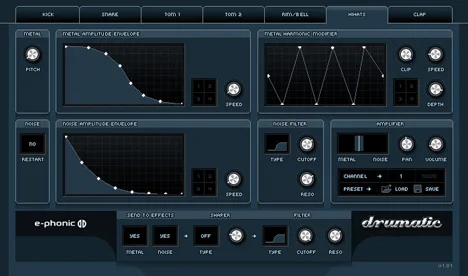
Drumatic 3 is an older drum synthesizer for creating electronic percussion from scratch. Its seven voices cover bass drum, snare, handclap, two toms, hi-hats and a rimshot or bell.
Graphical envelopes control amplitude and modulation. Each sound also has filtering and distortion or bitcrushing, allowing you to work on the attack and texture before processing the result in your DAW. Six assignable stereo outputs keep separate parts available for mixing.
E-Phonic provides version 3.02 in its archive of unmaintained Windows 32-bit VST2 plugins. It needs a compatible host or bridge and is separate from the paid Drumatic 4. The free version 3 licence grants use of the plugin; downloading a Drumatic 4 demo instead will introduce that product’s demo restrictions. Choose the archived version when you specifically want this free instrument.
Check it out: Drumatic 3
20. Line of Legends

Line of Legends is a sample-based hip-hop kit with 47 sounds. Its eight sections cover kick, snare, clap, snap, toms, hi-hat, ride and crash, giving you a focused collection rather than a large kit browser.
Each section has its own output, with controls for attack shaping, release and pan. Enable the additional outputs in your DAW if only the kick is audible at first; the multi-output arrangement is part of the instrument’s design.
The publisher offers free version 1.1 in Windows 32-bit and 64-bit VST and older Mac VST/AU packages. Keep the accompanying instrument-data folder with the plugin when installing it. This is useful for a quick hip-hop part, but producers wanting to load their own samples or browse many different kits will find Sitala or Drum8 more suitable.
Check it out: Line of Legends
21. VS Conga
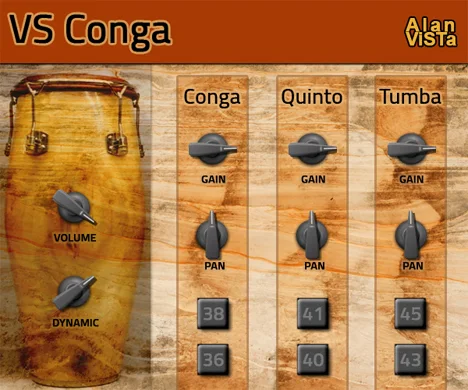
VS Conga adds sampled conga, quinto and tumba sounds to a drum arrangement. It is a focused option for hand-percussion patterns that would be awkward to build from the electronic kicks and snares elsewhere in this list.
The recordings come from Versilian Studios and include two playing techniques, round-robin variation and up to four velocity layers. Varying MIDI velocity helps you use those layers when programming repeated hits, while the separate drum pitches give you room to build a short phrase.
Alan ViSTa offers the instrument free, with official links to Windows 64-bit VST and Mac VST/AU downloads. There is no Windows 32-bit build in this release. It is a specialist percussion instrument rather than a complete drum kit, and the older Mac package should not be assumed to be native Apple Silicon software.
Check it out: VS Conga
22. Junn JM-1

Junn’s JM-1 is a small sample-based instrument with Linn-style drum sounds. It is worth considering if you already use a host that handles older Windows plugins and want a straightforward retro kit.
Individual controls let you balance the drum voices. The sound set includes the familiar kick, snare, hats, toms and other percussion used in early drum-machine arrangements. Program the notes from your DAW; the instrument does not provide the complete pattern-editing workflow of the original hardware.
The main downside is compatibility: the archived release is Windows 32-bit VST only. Many current DAWs cannot load it directly, so a suitable bridge or an older compatible host is necessary. It is not a Mac or native 64-bit instrument. For a new setup without legacy-plugin support, choose one of the newer-format instruments above.
Check it out: Junn JM-1
Conclusion
Start with one instrument that matches the part you need. MT Power Drum Kit 2 and BFD Player cover acoustic drums, Sitala 1 handles your own samples, and the dedicated kick synths let you design the low end. The legacy instruments remain useful when your host supports them, but check compatibility before building a project around one.
If you need larger libraries and more editing options, check out our guide to the best drum VST plugins.