The 12 Best Chord Generator Plugins and Tools – Free and Paid Options
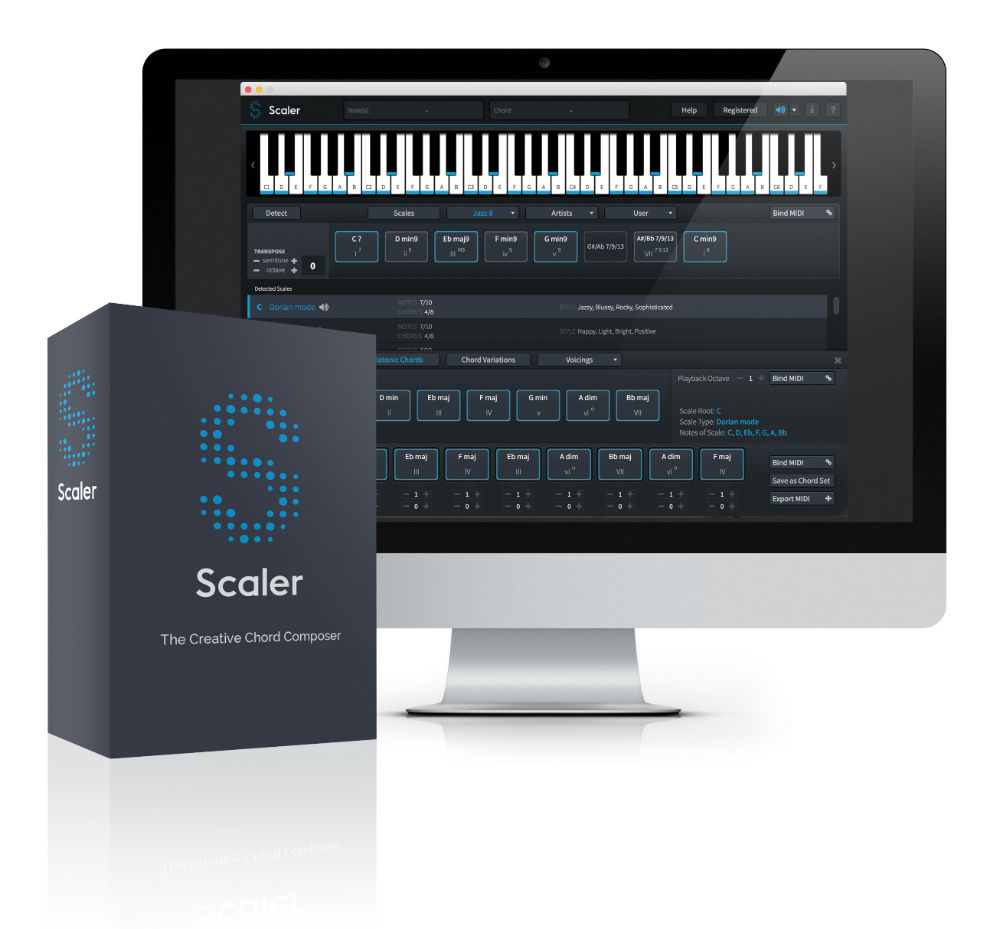
Scaler 3 is our first choice for exploring chords and arranging a progression. Chordjam is a good alternative for randomized voicings and rhythms, while InstaChord 2 suits one-key chord playing and strumming.
Chord generators can help you find ideas even if you already know music theory. Some suggest progressions, some turn one MIDI note into a chord, and others generate several song parts together. Choose the workflow you need before comparing presets.
Most of these tools generate MIDI, so you need an instrument to play the notes and a DAW that supports the required MIDI routing. We have also included free options and Hookpad, a browser-based songwriting tool rather than a VST plugin.
Contents
1. Scaler 3
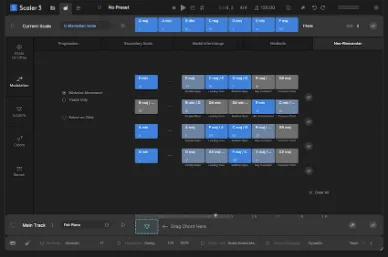
Scaler 3 detects chords, keys and scales from MIDI or audio, then suggests compatible chords. Its artist, genre and mood chord sets give you a starting point, while voicing controls help you shape the movement between chords.
The Arrange page adds a timeline with Chord Tracks and MIDI Lanes, so you can develop a progression into bass, melody and accompaniment parts. It can also host VST and AU instruments and effects, or send MIDI to instruments in your DAW.
Choose the full Scaler 3 licence if you are a new customer; the upgrade is for eligible existing owners. Scaler 2 remains a separate plugin, so installing Scaler 3 does not replace old projects automatically. Our Scaler 2 review covers the earlier version.
- Windows and macOS; 64-bit only
- VST, VST3 and AAX, plus AU on Mac and a standalone application
- The iPad edition is a separate purchase
Check it out: View Price
2. Chordjam

Chordjam builds chords and progression patterns through user-guided randomization. You can set the scale and chord type, then vary voicing, velocity and timing rather than accepting the same chord shape on every beat.
Its sequencer, arp mode and performance pads make it useful for evolving electronic parts. You can drag MIDI chords or patterns into your DAW. MPE support adds polyphonic portamento and gliding chords when the receiving instrument supports it.
It is a MIDI tool, so plan to route its output to a software instrument. The desktop and iPad versions have different purchase paths; the iPad version uses AUv3.
- Windows and macOS; VST, VST3, AU and AAX
- Chord and rhythm randomization with editable limits
- Test MIDI routing in your DAW using the trial
Check it out: View Price
3. InstaChord 2

InstaChord 2 lets you trigger chords with a single key and turn them into strums, riffs and rhythmic patterns. The pattern editor gives you control over note order, velocity and playback, which is useful when a sustained block chord sounds too static.
You can change voicings, build custom chords and drag the resulting MIDI into your DAW. Its chord and action-key mapping takes some setup, but it gives you more control over a performance than simply dropping in a chord loop.
The current desktop version is 64-bit and requires Windows 10/11 or macOS 10.15 or later. Try the demo to confirm routing in your host; its major-chord limitation does not make it a free full plugin.
- VST3, AU MIDI effect and AAX support
- Pattern editor and MIDI drag-and-drop
- Needs a host with suitable MIDI routing
Check it out: View Price
4. InstaComposer 3
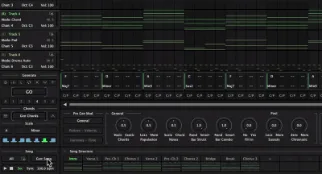
InstaComposer 3 is a broader songwriting option when you want a chord progression to produce related basslines, melodies and rhythms. It generates up to six MIDI tracks and organizes variations into scenes and song sections.
You can import MIDI, edit chords and notes, and use slash chords to choose a bass note other than the root. Its procedural generation follows adjustable musical rules; you still choose the sounds and edit the results into a finished arrangement.
Use the full product listing for a new purchase. The InstaComposer 3 upgrade requires an eligible earlier licence. MIDI drag-and-drop is useful in hosts where live multichannel routing is awkward.
- Desktop MIDI processor: VST3, AU and AAX
- Six-track generation with editable song sections
- Requires instruments to turn exported MIDI into sound
Check it out: View Price
5. Cthulhu

Cthulhu combines a chord memorizer with a pattern-based arpeggiator. A single key can recall a chord, then the arp reshapes its notes into a rhythmic phrase. It requires routing to an instrument to produce sound.
The chord module includes more than 150 presets and can learn chords or import MIDI. The arpeggiator has eight sequencing tabs with independent lengths, making it a useful choice for patterns that evolve rather than repeat identically.
Xfer offers Windows and Mac versions with VST, AU and AAX host support. Logic users should use the MIDI FX version; check the developer’s host guidance before buying.
- Chord memorizer and arpeggiator in one plugin
- Import MIDI or record your own chords
- Paid software with a time-limited demo
Check it out: Cthulhu
6. ChordPrism 2

ChordPrism 2 turns one-key chords into a playable setup for melodies, basslines and arpeggios. Its Smart Scale adapts the available melody notes to the active chord, helping you improvise around a progression without changing your hand position.
The current 2.2 product includes an internal sequencer, strummer and pattern generator. MIDI import lets you turn an existing progression into a playable preset, while chord editing and voicings let you change the harmony.
It supports VST instrument, AAX MIDI effect and AU MIDI effect workflows, and can host VST instruments where direct routing is limited. The developer specifies Windows 10 or macOS 11.5 or later and 16 GB RAM.
- Native Apple Silicon support
- Two-device licence with periodic online verification
- Free trial available; full version is paid
Check it out: ChordPrism 2
7. Captain Chords Epic

Captain Chords Epic is the chord-writing part of the Captain Plugins Epic suite. It lets you choose a key and scale, edit chord progressions and rhythm presets, and build workspaces for sections such as a verse or chorus.
You can use its sound presets, host compatible third-party instruments or send MIDI to another instrument. Captain Melody Epic and Captain Deep Epic can follow the chord setup, making the suite useful when you want connected melody and bass parts.
Export your finished progression as MIDI or audio for further editing in your DAW. Check the current suite contents before buying; Captain Chords is part of that wider purchase rather than a free download.
- Windows 10 or later and macOS 10.13.6 or later
- Native Apple Silicon support
- Chord, rhythm, sound and MIDI-export controls
Check it out: Captain Chords Epic
8. Tonespace

Tonespace is a free chord generator and visualizer. It displays scales and chord relationships on a grid and a piano keyboard, so it is useful for exploring harmony as well as triggering chords.
You can use a mouse or MIDI keyboard, try inversions and voicings, and send chords over MIDI to a synth. The fit-to-scale options help you audition alternatives without starting from an empty piano roll.
The developer provides 64-bit downloads for Windows, macOS and Linux, with VST, AU and standalone options. Check the available format for your operating system and your DAW’s MIDI-output setup.
- Free chord generator and visualizer
- Single-note MIDI triggering
- Useful grid view for learning chord relationships
Check it out: Tonespace
9. Chordz

Chordz is a free Windows VST2 MIDI plugin that turns single notes into chords. Each trigger can have its own voicing, and you can spread notes across octaves or divide the keyboard into chord and melody zones.
Its easy mode maps the selected scale onto the white keys. Velocity and note-delay randomization can add variation or emulate a strum, while templates give you a starting point for common scales and chords.
The current download requires a 64-bit VST2 host; the developer no longer provides the 32-bit version. It is free for commercial and non-commercial use, but there is no Mac, AU or VST3 edition listed.
- Free Windows-only plugin
- 64-bit VST2 host required
- Easy mode and editable custom chords
Check it out: Chordz
10. Ripchord

Ripchord is a free, open-source MIDI plugin for creating and playing chord progressions on Mac and Windows. You can map chords to single notes, save your own presets and use preset chord sets as a starting point.
It suits musicians who want a simple chord-playing tool rather than a complete arrangement workstation. Route its MIDI output to a software instrument, then record the progression in your DAW.
The project is distributed under the GNU GPL v3 licence. Check the download and plugin-format instructions for your computer before installing; MIDI routing still depends on the host.
- Free and open source
- Custom chord presets
- Mac and Windows MIDI workflow
Check it out: Ripchord
11. Harvest Mini

Harvest Mini is a free MIDI loop generator for chord progressions, melodies and drum patterns. Choose a scale and rhythm, set note length or octave, then generate variations to use as a starting point.
It remains useful if you want quick MIDI ideas rather than detailed chord analysis. Drag the result to an instrument track and edit the notes until the rhythm and harmony fit your song.
Check its older compatibility requirements carefully. The developer lists 64-bit VST2 and Mac AU workflows, with Apple Silicon requiring a DAW running through Rosetta. It does not offer Pro Tools support.
- Free plugin with Windows and Mac downloads
- MIDI ideas for chords, melodies and drums
- Legacy VST2 workflow; no native Apple Silicon support listed
Check it out: Harvest Mini
12. Hookpad (Browser-Based Tool)

Hookpad is a browser-based songwriting tool, not a VST plugin. Its chord palettes and color-coded melody guides help you write a progression and understand which notes fit over it.
It is a useful alternative if you prefer to work on harmony outside your DAW. You can build an arrangement with its band sounds, then bring the idea into a production project through MIDI export on a suitable paid plan.
The free tier includes chords, melody, guides and cloud saving. MIDI export and the wider instrument collection belong to the paid Standard tier, while Aria’s generative suggestions are a separate add-on.
- Runs in a browser
- Free tier for exploring chords and melody
- Check paid-plan requirements for MIDI export
Check it out: Hookpad (Browser-Based Tool)
Which Chord Generator Should You Choose?
Choose Scaler 3 for chord detection and arranging, Chordjam for randomized voicings and rhythms, or InstaChord 2 for playable strums. InstaComposer 3 makes more sense when you want several related MIDI parts. For a free starting point, try Tonespace; Windows users with a VST2 host can also use Chordz.
Do Chord Generators Make Sound?
A MIDI chord generator sends notes rather than a finished audio recording. Route those notes to a piano, synth or other instrument in your DAW, or use a tool that can host an instrument. Check the plugin format and MIDI-output setup before buying: support for AU, VST or AAX does not make every routing method identical.
Conclusion
Chord generators can help you get past an empty project, but the useful part is what you do with the suggestion. Change the voicing, rhythm and bass notes, listen against the melody, and edit the progression until it fits the song.