The 7 Best Audio Interfaces for Recording Acoustic Drums (2026)

When recording drums, you need an audio interface that is of good quality and has enough inputs for all of your drum mics. You can always borrow, or you may already have some small audio interface with 1-4 inputs that will suffice, but even a basic mic setup for drums can easily take 8 microphones.
When you’re looking for an audio interface to record the drums that you can use in the long run, you really shouldn’t be looking for anything under 8 inputs. This also extends to anyone starting their music studio, as more inputs enable you to easily record more instruments at once, which can give you a ton of opportunities while working.
My top recommended audio interface is the Focusrite Scarlett 18i20 4th Gen. This is an 18-in, affordable audio interface from a reputable company.
My second recommended audio interface is the Behringer U-PHORIA UMC1820. This is a budget-friendly audio interface that is expandable with up to 18 inputs.
Contents
- The 7 Best Audio Interfaces for Recording Drums (2026)
- 1. Focusrite Scarlett 18i20 4th Gen
- 2. Behringer U-PHORIA UMC1820
- 3. RME Fireface UFX II
- 4. Fender Studio Quantum HD 8
- 5. Universal Audio Apollo x8p Gen 2 with Analog Classics
- 6. TASCAM US-16x08
- 7. Audient EVO 16
- How do you Record Acoustic Drums?
- Do you need a Mixer or Audio interface to Record Drums?
- How do you Record Drums with an Audio Interface?
- Conclusion
The 7 Best Audio Interfaces for Recording Drums (2026)



Let’s compare these in more detail.
1. Focusrite Scarlett 18i20 4th Gen
For most drummers building a mic setup around one interface, the Scarlett 18i20 4th Gen is the easiest recommendation here. Eight onboard mic preamps can take a practical close-mic and overhead layout without an extra converter. You can add channels through ADAT later if your sessions grow. That makes the upgrade path more useful than buying a two-preamp interface and assuming expansion will be simple.
The current 18i20 adds Auto Gain and Clip Safe, useful when you are setting several microphones around a kit and cannot sit at the computer for every adjustment. Its front-panel metering and Focusrite Control 2 give you two ways to check levels. Still, set microphone positions and listen to the drummer first; automatic gain cannot fix a cymbal-heavy overhead or a poorly placed snare mic.
Two mic or instrument inputs are on the front, with the remaining combo inputs at the rear. The unit also has two headphone outputs, MIDI, S/PDIF and ADAT connections. These are real ways to share a click, add a room mic later and integrate other studio gear. The digital connection count is the maximum expansion potential, not eighteen built-in microphone sockets.
I would start with this if you want a tidy rack setup that works for a full acoustic kit today. The Behringer below is the simpler budget path; the Audient EVO 16 is worth a look when fast multichannel gain setting matters most. The Scarlett earns the top position for its balance of onboard preamps, control and room to expand.
2. Behringer U-PHORIA UMC1820
The Behringer U-PHORIA UMC1820 is one of the best value-for-money purchases on the market right now. For an extremely affordable price, you get 8-inputs and 10-outputs which is more than enough to record an entire acoustic drum kit.
Not only does the Behringer interface have a wide selection of ins and outs, but it also features Midas-designed mic preamps that are excellent for audio reproduction. The zero-latency nature along with 24-bit/96kHz resolution ensures superb value for money.
The UMC1820 is truly a great purchase, especially considering the rugged rackmount construction and design. It’s powered by a 12V DC power supply which is included in the package and also has phantom power.
All in all, for the given price, you’ll likely find a better value-for-money purchase that is capable of recording your entire drum set.
3. RME Fireface UFX II
The RME Fireface UFX II is a high-end but very high-quality audio interface with staggering 30 inputs and 30 outputs to work with. Granted, the price range is pretty steep, however, if you have the budget, what you get is unlike any other audio interface.
This audio interface is stacked with features. With premium sound, more than enough ins and outs, AD/DA converters, and excellent connectivity options that integrate impressively with any software and production situation.
Along with analog and digital ins/outs, you also have two headphones jacks, two MIDI ins/outs, USB, and a Clock input/output. When it comes to versatility and connectivity, this interface is hardly beatable. It has four onboard mic and instrument preamps. For a typical full acoustic drum mic setup, you will need a compatible external preamp via ADAT or another suitable front end; its 30 input channels are not 30 built-in microphone preamps.
The RME Fireface UFX II is a pro-grade audio interface, complete with its own ARC USB remote for optimal control, and brings a whole new meaning to a feature-packed design.
4. Fender Studio Quantum HD 8
The Fender Studio Quantum HD 8 is a current rack interface for someone who wants eight microphone channels and detailed control during full-band sessions. This is the current Fender Studio-branded Quantum HD 8, not the older Studio 1824c. Its eight MAX-HD preamps provide the inputs a drummer needs for kick, snare, toms and a stereo overhead pair without adding another preamp first.
Auto Gain can set starting levels across the inputs, while the front display makes it easier to see which channel needs attention. The interface also supplies two headphone outputs and flexible line outputs for separate monitoring paths. If you record yourself, being able to see the whole kit’s levels at once is more useful than a long list of theoretical channels.
The optical ADAT connections leave room for extra microphones or a larger session. Front instrument inputs and re-amp outputs are helpful if the same room also records guitar and bass. Those are secondary benefits for this guide; the reason to choose the HD 8 is its eight-preamp drum workflow. Check the current Fender Studio software and computer requirements before buying for an older recording machine.
Choose this over the Scarlett when the Quantum’s display, monitoring arrangement and Fender Studio workflow suit your room. Both cover a complete kit from their onboard mic inputs. The RME and Apollo serve different premium needs, while the EVO 16 below keeps the level-setting process especially simple.
5. Universal Audio Apollo x8p Gen 2 with Analog Classics
The Apollo x8p Gen 2 is the Universal Audio option that actually fits a full acoustic drum kit. Unlike the old Twin X in this slot, it has eight onboard Unison microphone preamps. That means you can connect a useful set of drum microphones without purchasing an additional ADAT preamp simply to reach the basic input count.
Its appeal is the established Apollo tracking system: Unison-capable front-end control and UAD processing while you record. For a drummer who already works in that environment, hearing a monitor mix with familiar processing can be valuable. The current base package is the Analog Classics version; do not assume that every UAD plug-in or an upgraded bundle is included.
The rack unit also provides line and optical connections for a studio that grows beyond one drum kit. Those connection totals should be read alongside the eight physical mic preamps, not as eight extra microphones built into the box. It uses Thunderbolt, so check your computer and operating-system support before treating it as a drop-in USB replacement.
This is a specialist premium choice. It is a strong fit when the Unison and UAD workflow is already part of your recording plan, and a less economical starting point when you only need clean multitrack capture. The Scarlett, Quantum and Audient cover eight mics in more straightforward USB setups; the RME remains the routing-focused pro option.
6. TASCAM US-16x08
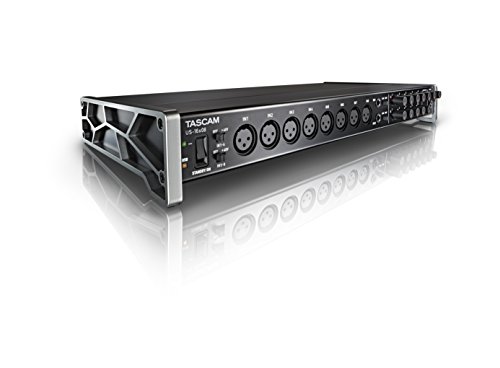
The TASCAM US-16×08 is an entry to mid-level audio interface with 8 XLR and 8 line inputs, 8 line outputs, a 1/4″ stereo headphone jack, a MIDI in/out, and a USB-B connection. This is a great, affordable audio interface that is ideal for recording an acoustic drum kit right off the bat.
It comes with 8 Ultra-HDDA mic preamps for seamless operation and has an almost latency-free monitor mixing. This interface is multi-compatible, ensuring Mac, Windows, and iOS compliance, and is powered by a 12V DC power supply.
The TASCAM is a convenient interface, with all the controls placed on the front panel for easy access. It’s the embodiment of a simple yet flexible desktop/rackmount design that is perfect for beginner music producers to get into recording.
Overall, if you want a budget-friendly, simple, multi-compatible audio interface with enough inputs and outputs and quality sound reproduction, the TASCAM US-16×08 is an audio interface you should consider.
7. Audient EVO 16
The Audient EVO 16 closes this list with a compact way to manage eight drum microphones. The old Roland OCTA-CAPTURE offered a small multichannel package, but its sales have ended. EVO 16 keeps the useful eight-preamp role and adds a current USB-C interface with a clear display and rack-friendly shape.
Smartgain is its practical advantage for drum recording. You can arm all eight channels and let the interface establish starting gain from a short performance. That saves repeated walks between the kit and the desk when you record yourself. It is still a starting point: play your loudest passages, inspect the meters and listen for bleed before you commit a take.
The EVO 16 also offers two independent headphone outputs, eight line outputs and optical digital expansion. A stereo pair of overheads, kick, snare and tom microphones can be connected directly; extra room or percussion channels can be added later with suitable ADAT hardware. Its maximum digital channel count should not be confused with the eight onboard microphone sockets.
This is the pick for players who value a quick repeatable setup over deep front-panel tweaking. It travels more easily than a large studio rack, although it still needs its own power and space for cables. If you want the most familiar all-round starting point, return to the Scarlett; choose EVO when multichannel Smartgain and a compact control surface solve a real problem in your room.
How do you Record Acoustic Drums?
To record acoustic drums you need some drum mics, an audio interface, and recording software. You can use drum mics or individual microphones for each drum or you can alternatively use overhead drum mics depending on what type of sound you are going for and what budget you have available.
Do you need a Mixer or Audio interface to Record Drums?
You do not need a mixer to record acoustic drums. If you have an audio interface that has enough inputs, then you can just record these directly into some DAW software and then you can mix the sounds digitally from the DAW after. Optionally, you can also use a MIDI controller, and you want to use some hardware for better interaction with the software.
How do you Record Drums with an Audio Interface?
To record drums using an audio interface, you simply connect the audio interface to your computer (usually via a USB cable), then you connect each of the mics to the inputs on your audio interface using XLR cables.
Make sure to set the inputs high enough on your audio interface. Then create a bunch of audio tracks on your DAW software, set the inputs, and then press record.
There are many other steps such as gain staging and applying effects, EQ, and more. However, these are the basics for how you record drums using an audio interface. You do not need an external mixer or other equipment as all of this can be done within the DAW.
Conclusion
I hope that this list will at least somewhat help you with your decision about buying the perfect audio interface for yourself. There are, of course, loads more similar devices on the market, but I believe that these seven are currently the best in their price range. Keep in mind that to record an acoustic drum kit, you will need an audio interface with at least 8 inputs.
My top pick is the Focusrite Scarlett 18i20 4th Gen, an 18-in, affordable audio interface from a well-known company.
My budget pick is the Behringer U-PHORIA UMC1820, an affordable audio interface, expandable with up to 18 inputs.